Two packages to deal with data becoming unavailable for programmatic access.
geeky
Author
Affiliation
Jens von Bergmann
MountainMath
Published
October 26, 2026
The data world is getting more complicated. Recently I have encountered several instances where data used to be openly available and has become partially locked off. Not locked off in the sense that the data can’t be accessed at all, but that typical data analysis workflows can’t reach it any more.
Recent examples I ran into are:
StatCan is blocking programmatic access to much of it’s census data since October 2nd this year. The data can still be downloaded manually in a browser, but can’t be requested directly from R or python or other data analysis environments in reproducible analysis workflows.
City of Vancouver hosts some open data not directly via the API but as files for download, while the API merely provides links to the files. But the files can no longer be accessed programmatically, navigating the API on the web and downloading the data from there still works.
In both of these cases the respective institutions have told Cloudflare to block access.1 It will likely take time until open data providers figure out systematic solutions to this problem, we need to find solutions that bridge this gap. This need has lead me to develop two separate packages over the past weeks that attack this from two different directions:
safeconduct provides safe travel through this newly forming data access war zone while striving to minimize harassment.
r2parquet provides a principled way to self-host data. When automated reproducibility is a priority, self-hosting the data can solve the download problem.
Neither of these are on CRAN right now, if you find these packages useful or have ideas how to improve them I would love to hear about it.
safeconduct
safeconduct is meant to be a drop-in replacement for file.download or curl requests. It’s fetch(url, desination_path) fetches the remote file, slowly escalating it’s methods. It starts with a simple curl request, then escalates to headless chrome, chrome with spoofed user agent, an interactive chrome session, and finally a live chrome session where users have to solve a captcha to get to the file download.
This is cumbersome, but it gets the job done in situations where user interaction is acceptable. It may still fail in environments that require full automations, e.g. a replication project in a docker environment.
This functionality is useful for ad-hoc workflows, but it can also be integrated into other R packages to ensure users still have access to data. In fact, this was the main motivation of building this, the StatCan data download blocks have impacted several of my R packages. Switching out traditional download functionality with safeconduct::fetch() mitigates this problem. Once offending organizations like StatCan fix the problem on their end (they do understand it’s a problem but don’t seem to think it’s high priority to fix), then the call through safeconduct will essentially be the same as a regular file download.
We briefly show how safeconduct can be used as a drop-in using the StatCan correspondence file as an example. A simple download.file fails.
<code>
url <-"https://www12.statcan.gc.ca/census-recensement/2021/geo/aip-pia/correspondence-correspondance/files-fichiers/2021_92-156-X_DA_AD.zip"da_ad_zip <-file.path(tempdir(), "da_ad.zip")download.file(url, da_ad_zip, mode ="wb")## Warning in download.file(url, da_ad_zip, mode = "wb"): downloaded length 0 !=## reported length 21961## Warning in download.file(url, da_ad_zip, mode = "wb"): cannot open URL## 'https://www12.statcan.gc.ca/census-recensement/2021/geo/aip-pia/correspondence-correspondance/files-fichiers/2021_92-156-X_DA_AD.zip':## HTTP status was '403 Forbidden'## Error in `download.file()`:## ! cannot open URL 'https://www12.statcan.gc.ca/census-recensement/2021/geo/aip-pia/correspondence-correspondance/files-fichiers/2021_92-156-X_DA_AD.zip'
Similar results for curl.
<code>
curl::curl_download(url, da_ad_zip)## Error in `curl::curl_download()`:## ! HTTP response code said error [www12.statcan.gc.ca]:## The requested URL returned error: 403
Swapping in safeconduct::fetch works, and it reports on the path it tried and which method was ultimately successful.
<code>
safeconduct::fetch(url, da_ad_zip)## 'www12.statcan.gc.ca' is asking for a browser check; sending a browser through.## Trying headless Chrome first.## Passed, but the clearance does not transfer to curl; downloading under escort, in the browser.## The server is asking for a browser check at the file's URL first; headless Chrome passes it without a click, but it may take two minutes.## If it has not passed by then, a window is opened.
It passes after a 2 minute curfew without user interaction. It also indicates how to speed up this process and avoid the curfew, at the expense of requiring user interaction to clear a captcha challenge.
The package can also be used to grab web pages, for example to discover content. For example, the Road Network Files get new versions every year, to discover them we need to read the overview web page. But this is blocked from regular programmatic access.
<code>
rnf_overview <-"https://www12.statcan.gc.ca/census-recensement/2021/geo/sip-pis/rnf-frr/index-eng.cfm"rnf_html <- rvest::read_html(rnf_overview)## Error in `open.connection()`:## ! cannot open the connection
safeconduct provides a way around this.
<code>
rnf_html <- safeconduct::page_html(rnf_overview) ## 'www12.statcan.gc.ca' is asking for a browser check; sending a browser through.## Trying headless Chrome first.## Passed, but the clearance does not transfer to curl; reading under escort, in the browser.
When reading many files or web pages it’s worthwhile to fetch and reuse a session object as indicated in the message.
Similarly, The City of Vancouver open data download fails using standard method.
<code>
api <-"https://opendata.vancouver.ca/api/explore/v2.1/catalog/datasets/municipal-election-results/records?limit=20"elections <- jsonlite::fromJSON(api)$resultsurl <- elections$link_to_csv[elections$election =="2026 Municipal Election"]results_zip <-file.path(tempdir(), "results.zip")download.file(url, results_zip, mode ="wb")## Warning in download.file(url, results_zip, mode = "wb"): cannot open URL## 'https://webtransfer.vancouver.ca/OpenData/csv/2026MunicipalElectionResults.zip':## HTTP status was '403 Forbidden'## Error in `download.file()`:## ! cannot open URL 'https://webtransfer.vancouver.ca/OpenData/csv/2026MunicipalElectionResults.zip'
The City of Vancouver uses a different block setting from StatCan, safeconduct::fetch gets around this without delay and user prompt.
<code>
safeconduct::fetch(url, results_zip)## 'webtransfer.vancouver.ca' turns plain requests away; sending a browser through.## Trying headless Chrome first.## Passed, but the clearance does not transfer to curl; downloading under escort, in the browser.
If we want to better understand the block settings, safeconduct::probe() inspects the server response chain. This can get messy, if interested open the tab.
In summary, safeconduct::fetch provides a drop-in solution for data download in an environment where data is blocked from programmatic access.
r2parquet
Another way around blocked download is to self-host the data. When considering self-hosting on faces two fundamental question:
What data format should be used?
Where should the data be hosted?
This package gives an opinionated answer to both of these:
Data format should be hosted parquet or geoparquet
Data should ideally be hosted on Cloudflare R2 (other S3 compatible services are ok too)
I want to talk a little about these two choices.
Cloudflare R2
This is the softer of the two. Ultimately it does not matter that much where data is hosted, anything will do. However, each cloud provider and service comes with slightly different trade-offs. While these don’t matter much in the grand scheme of things, R2 has one key advantage over most: zero egress fees. When hosting data, one part of the cost is paying for the data transfer when others download the data. There are still fees per request, but not for data transfers. And there are still storage fees. As a comparison, AWS S3 also charges for storage and per request (at slightly higher rates than R2) and additionally charges for data transfer. Cost is of course not the only factor that matters, and there are good reasons to choose different services for different use cases, but for hosting open data R2 hits the sweet spot.
Secondary reasons why R2 is a good choice is Cloudflare’s automatic global delivery and caching. One added complexity that comes with that is the need for cache invalidation when changing data, which is something the package handles under the hood.
That being said, many people already have S3-type cloud storage setups and the package also supports basic functionality for services based on the S3 protocol like Amazon S3 or MinIO, and writing private and publicly accessible data to these services.
If people have other preferences the parquet functionality works just fine for creating parquet files optimized for cloud access and with metadata and accessing parquet files in the cloud, and users will have to handle the data upload themselves.
Parquet
This is the big decision, but also the easiest one to make. It still surprises me how often I encounter people working with data who are unfamiliar with parquet.
Parquet rules the world of modern data. It sits at the base of pretty much any modern data lake, it’s how most of the data is stored there. For example Apache Iceberg or Delta Lake heavily rely on parquet. I won’t go into details of why parquet has become so dominant, but will highlight a couple of features why parquet works so well for hosting open data in the cloud.
What is parquet?
Apache Parquet is an open source, column-oriented data file format designed for efficient data storage and retrieval. It provides high performance compression and encoding schemes to handle complex data in bulk and is supported in many programming languages and analytics tools. Apache Parquet
Column-oriented means that data is stored one column at a time, as opposed to row-based storage like CSVs where data is stored one row at a time. One advantage to column-oriented storage is that data compresses really well, columns often contain similar values. Another is that one is often only interested in a subset of columns, making it easy to skip columns one is not interested in.
The second essential feature that makes parquet work for cloud storage is that one can strategically only read (roughly) the data one needs. There are plenty of explainers out there for people wanting the technical details how this works, for this post what’s important is that what makes this work is sorting of the data in ways that put data that is generally queried together in proximity, and setting the size of “row groups” to balance granularity that allows targeted picking of data with number of requests required to do so and metadata overhead. And that data can be “partitioned” into independent chunks, which helps in situations where the first operation is to filter on a specific dimension and then further select data by a different dimension.
Taken together, what this means is that one can efficiently work with data in a parquet file hosted in the cloud without having to actually download the entire data first. That gives users of this data two good pathways to interact with it:
If the data is used infrequently and one is only interested in small subsets of the data, then we can just strategically access parts of the data from the parquet file in the cloud.
If we frequently work with the data, or are accessing large portions of the data, then we can download and cache the parquet file locally.
With geoparquet 2.0 this now allows gives efficient access to geospatial data and allows for spatial queries of static parquet files in the cloud.
Metadata
Parquet integrates metadata right into the parquet file. This means metadata does not need to get shipped separately and always stays with the data. The package does not require that metadata be added, but strongly encourages it. In particular data should come with a title, a source URL, attribution, license and licence URL. If the metadata contains column labels, these will be added as labels to the column names on collect.
Example usage
Most people will use this package to access data others have made available. There are other ways to access publicly available parquet files in the cloud, this package adds some convenience that we highlight here.
Connecting to the remote parquet files is easy and fast. It fetches just the metadata and sets up a DuckDB connection to the remote file as a lazy table.
Once we have the connection we can start looking at what data it holds, starting with the metadata.
<code>
db_table |>parquet_metadata()## <parquet metadata: 19 entries>## en fr## licence Statistics Canada Open Licence Licence ouverte de Statistiqu…## licence_url https://www.statcan.gc.ca/en/… https://www.statcan.gc.ca/fr/…## languages en, fr## title 2021 Census – Boundary files … Recensement de 2021 – Fichier…## source_url https://www12.statcan.gc.ca/c… https://www12.statcan.gc.ca/c…## reference_guide https://www12.statcan.gc.ca/c… https://www12.statcan.gc.ca/c…## attribution Statistics Canada, 2021 Censu… Statistique Canada, Fichier d…## notes The identifiers of the contai… Les identificateurs des géogr…## columns <13 columns, see below>## primary_key DBUID## geometry_repairs {"columns":"DBUID","rows":["10010273010","10010667008","10010…## processing Repaired 830 of 498,547 geometries that were invalid, via sf:…## ## columns en fr## DBUID Dissemination block ID Identificateur unique de l'îlot …## DAUID Dissemination area ID Identificateur unique de l'aire …## CTUID Census tract ID Identificateur unique du secteur…## CSDUID Census subdivision ID Identificateur unique de la subd…## CMAUID Census metropolitan area or cens… Identificateur unique de la régi…## CMAPUID CMA/CA provincial part ID: Provi… Identificateur unique de la part…## CDUID Census division ID Identificateur unique de la divi…## PRUID Province or territory ID Identificateur unique de la prov…## DGUID Dissemination geography unique i… Identificateur unique de géograp…## DBRPLAMX Representative point, x (Lambert) Point représentatif, x (Lambert)## DBRPLAMY Representative point, y (Lambert) Point représentatif, y (Lambert)## LANDAREA Land area (km²) Superficie des terres (km²)## geometry Boundary, Statistics Canada Lamb… Limites, projection conique conf…
Here we see basic information about the data that was encoded when creating the parquet file. This makes it easy to understand where the data came from, how it can be used, and where to find further information. It also contains information about data processing when creating the parquet file, in this case information that invalid geometries that the StatCan data ships with were repaired, together with information which geometries were repaired. r2parquet automatically repairs invalid geometries and generates the corresponding metadata entry, the geometry_repairs entry is only generated if a primary key was supplied or if a naive discovery surfaces a variable that can serve as primary key.
We can also inspect the columns so we know how to query the data.
To get an idea how many dissemination blocks the data hold we can query summary statistics.
<code>
db_table |>count()## # A query: ?? x 1## # Database: DuckDB 1.5.6 [root@Darwin 27.0.0:R 4.6.1/:memory:]## n## <dbl>## 1 498547
None of the above queries have resulted in data requests from the server, this is all using the metadata that was fetched when connecting to the remote parquet file.
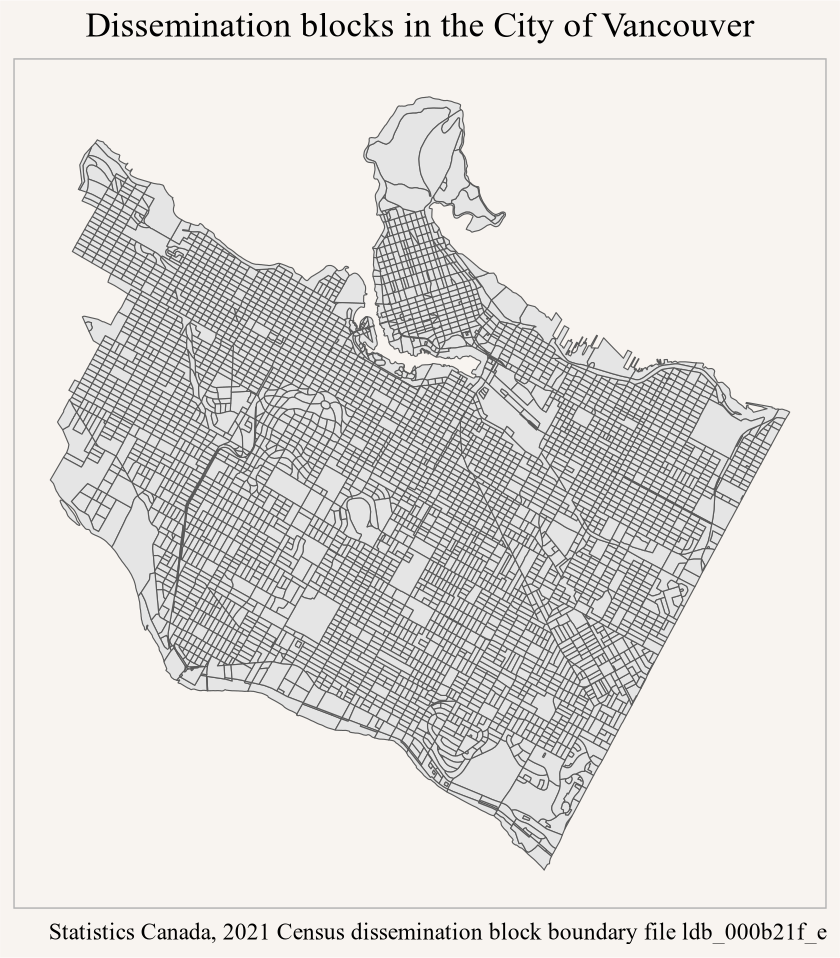
For our first data request we are interested in all dissemination blocks in the City of Vancouver.
This is still a (filtered) lazy table and no remote data has been fetched at this point. Selecting just the variables we want keeps subsequent requests efficient and lean. To map it we collect the data from the remote parquet file and graph it.
<code>
tic("Fetching DB data for CoV")plot_data <- data_csd |>collect_parquet()toc()## Fetching DB data for CoV: 0.706 sec elapsedggplot(plot_data) +geom_sf() +coord_sf(datum=NA) +labs(title="Dissemination blocks in the City of Vancouver",caption=parquet_sources_attribution(plot_data))
Figure 1
Calling collect_parquet collects the data, converts it to and sf object if the data is spatial, and attaches the metadata as attribute so it’s easy accessible. In this case we used the metadata for the attribution in the graph.
Here it is important to note that this data request was fast, a fraction of a second, because parquet allows for range requests that (roughly) target the data that is needed and only downloads that.
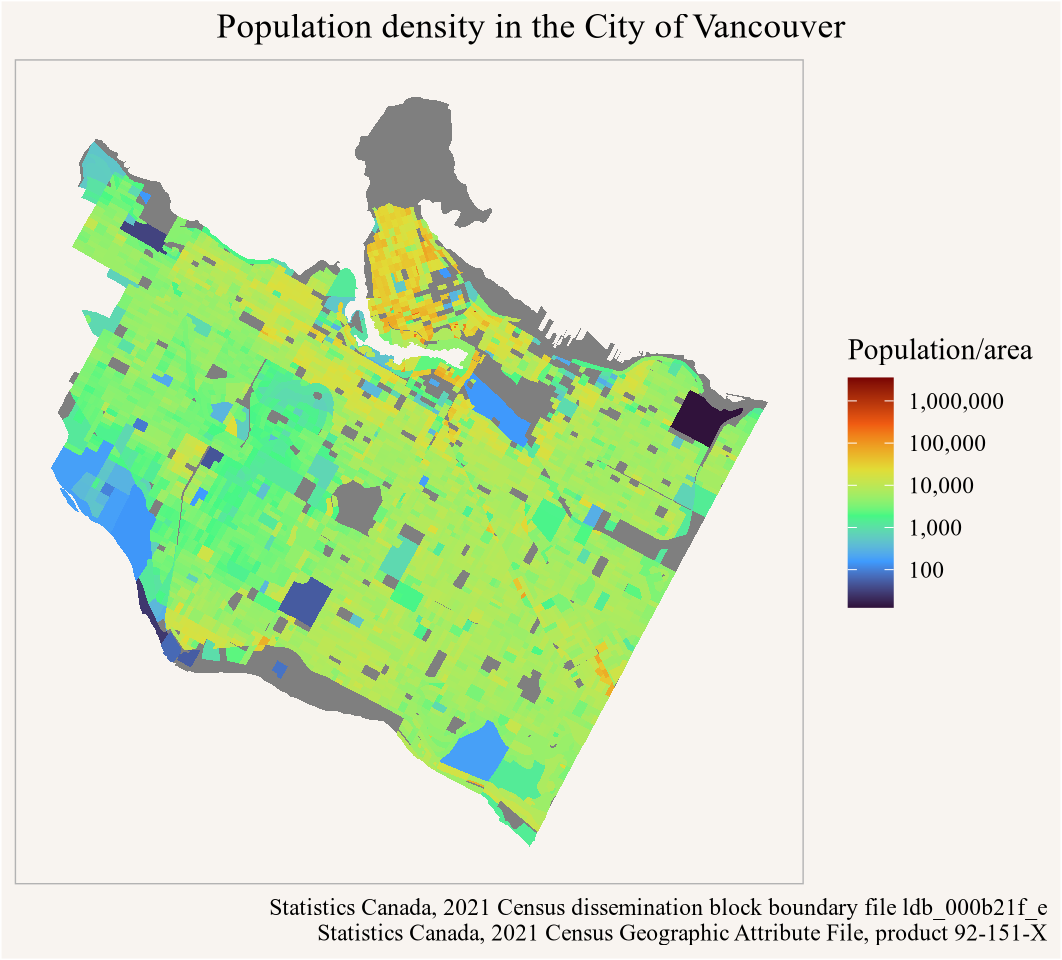
To make this more interesting we can plot the population density. For this we fold in the population counts from the geographic attributes file which we also hosted as parquet.
The package sets things up so that all parquet files are lazy tables in the same (in memory) DuckDB database, so we can simply join the two tables to collect data with population counts.
<code>
tic("Collecting joined data")cov_pop <- data_csd |>inner_join(geo_attributes, by="DBUID") |>collect_parquet() toc()## Collecting joined data: 0.707 sec elapsedggplot(cov_pop, aes(fill=Population/area)) +geom_sf(colour=NA) +scale_fill_viridis_c(option="turbo", trans="log",breaks=100*10^seq(0,10),labels=scales::comma_format()) +coord_sf(datum=NA) +labs(title="Population density in the City of Vancouver",caption=parquet_sources_attribution(cov_pop, sep ="\n"))
Figure 2
This is again a sub-second query, although this benefited from the previous query with partially cached results.
Since we already had the City of Vancouver geographies we could have been more efficient and fetched just the geo attributes for the City of Vancouver, ideally by just filtering on the CSUID, and joined the data afterwards.
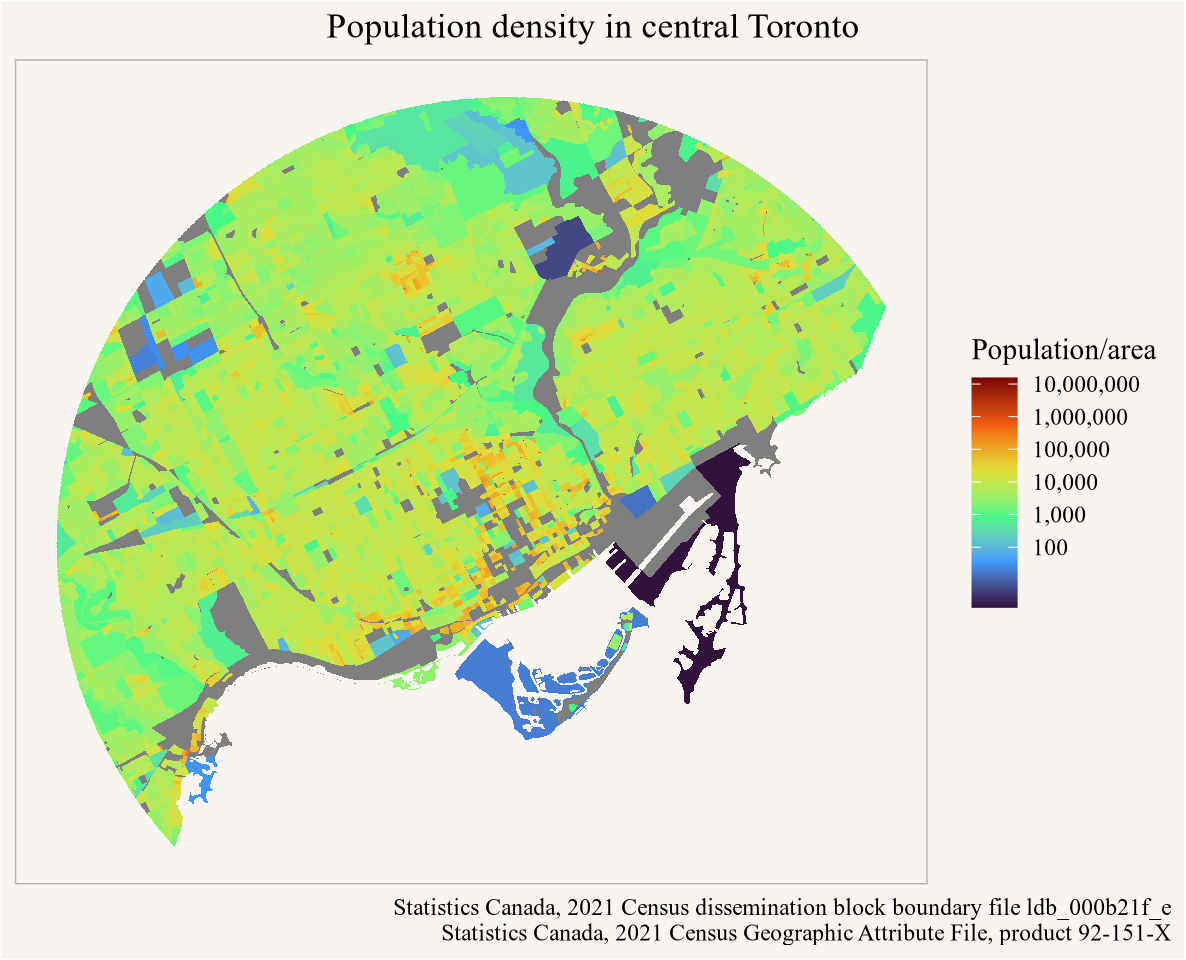
We can also query data spatially in an efficient manner. When creating or uploading parquet files with geographic data r2parquet will automatically optimize the data for spacial queries and order it by Hilbert curve, next to other ordering parameters supplied.
<code>
library(sf)mask <-st_point(c(-79.3842, 43.6514)) |>st_sfc(crs =4326) |>st_buffer(10000, max_cells =10000) tic("Complex spatial plus join query")data_mask <- db_table |>select(DBUID,area=LANDAREA,geometry) |>st_filter(mask) |>inner_join(geo_attributes, by="DBUID") |>collect_parquet()toc()## Complex spatial plus join query: 1.268 sec elapseddata_mask |>st_intersection(mask |>st_transform(st_crs(data_mask))) |>ggplot(aes(fill=Population/area)) +geom_sf(colour=NA) +scale_fill_viridis_c(option="turbo", trans="log",breaks=100*10^seq(0,10),labels=scales::comma_format()) +coord_sf(datum=NA) +labs(title="Population density in central Toronto",caption=parquet_sources_attribution(data_mask, sep ="\n"))
Figure 3
The spatial query runs a bit longer, over a second.
The queries would run faster if we had the data cached locally. To cache files locally, the R2PARQUET_CACHE_PATH environment variable needs to be set to a local path where parquet files should be cached. Then simply passing parquet_tbl(..., cache = TRUE) will download the file to the local cache path if it does not exist and use the locally cached parquet file. At the first time this gets called in a session parquet_tbl will check the ETAG of the remote parquet file to ensure the local copy is up-to-date and update it if not.
<code>
tic("Opening parquet connection, downloading the data for local caching")db_table_local <-parquet_tbl(census_db_url, cache =TRUE)toc()## Opening parquet connection, downloading the data for local caching: 10.987 sec elapsed
It takes around 10 seconds and downloads the 330 MB parquet file, this is worth it if we work with the file regularly. Subsequent data queries are faster now, we just show one example. Another advantage is that this now works offline too.
<code>
tic("Reading local DB data for CoV")data_csd_local <- db_table_local |>filter(CSDUID=="5915022") |>select(DBUID, area=LANDAREA, geometry) |>collect_parquet()toc()## Reading local DB data for CoV: 0.059 sec elapsed
We can list the cached files with list_parquet_cache and remove files from the local cache if we don’t need them any more.
<code>
remove_parquet_from_cache(census_db_url)
Creating parquet files
The package can also be used to create local or remote parquet file. While there are many alternative ways to work with local parquet data, r2parquet adds principled metadata support, handling of in-place rewriting of data, as well as convenience functions when dealing with geoparquet, makes this package a good candidate for working with local parquet files too.
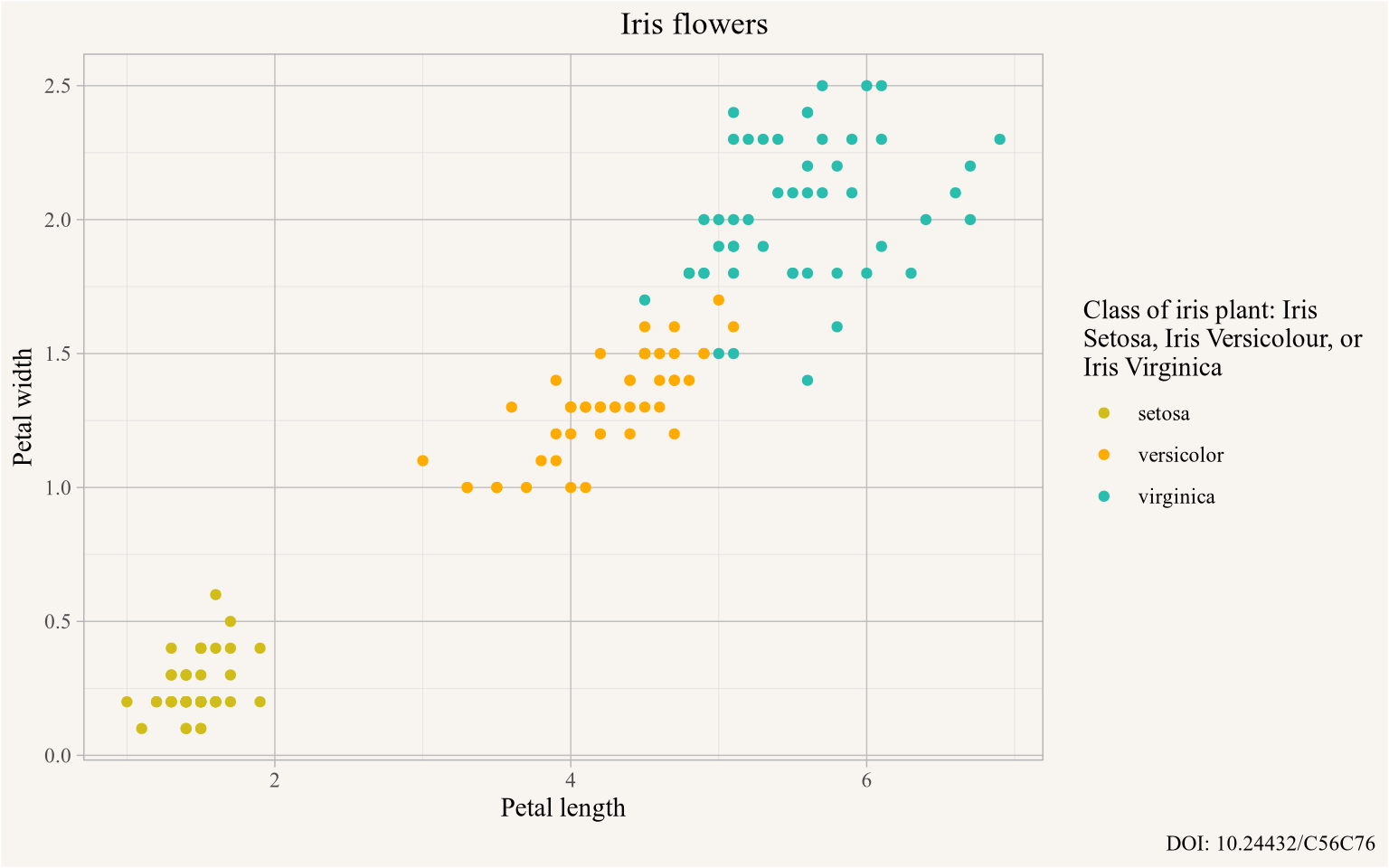
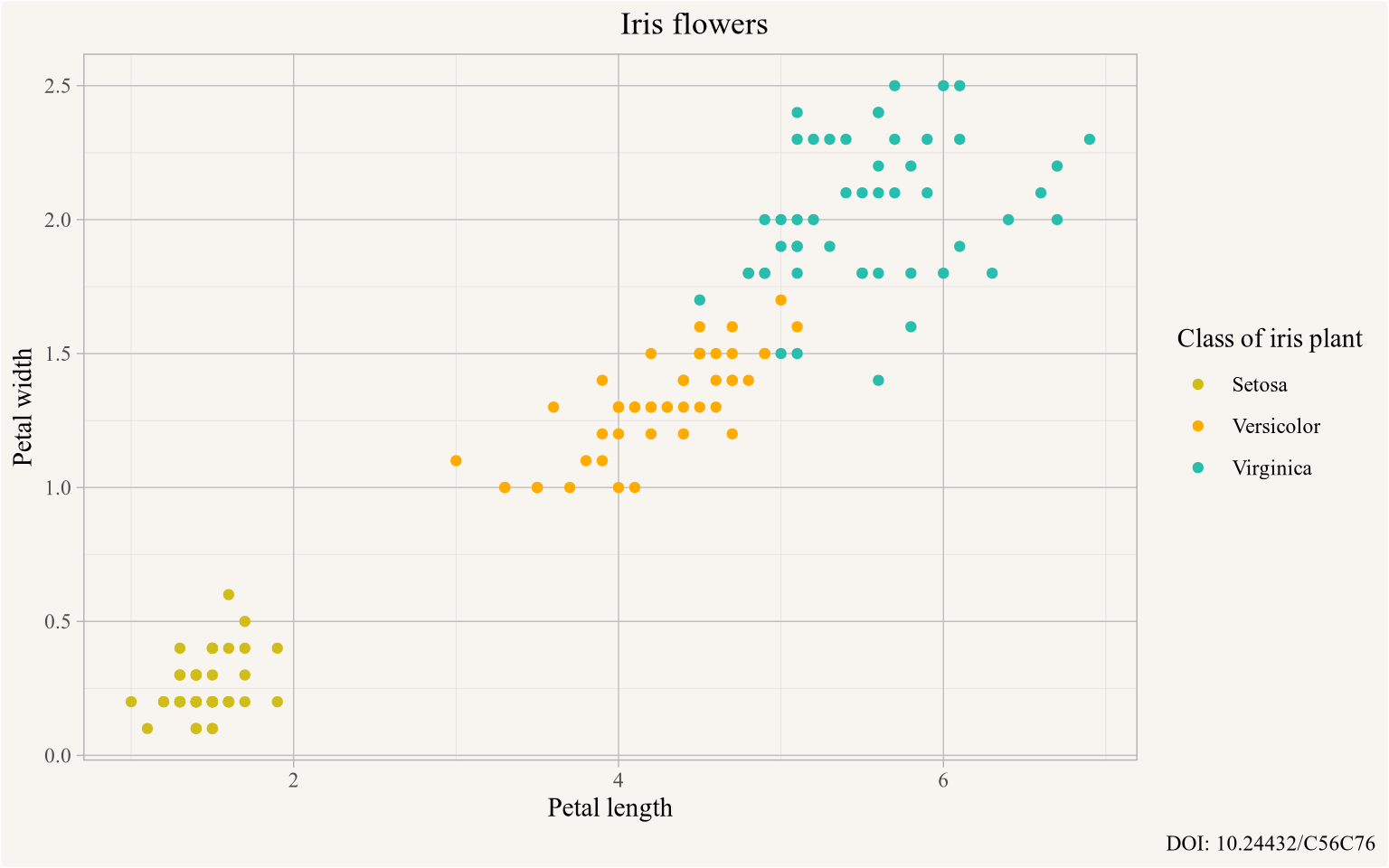
For example, we can write the iris dataset to parquet. We also use this opportunity to showcase how metadata can be added to parquet files in r2parquet.
<code>
parquet_test <-tempfile(fileext =".parquet")iris |>data_to_parquet(parquet_test, metadata =list(title="Iris flowers",author="Edgar Anderson",publisher="Sir Ronald A. Fisher",source_url="https://archive.ics.uci.edu/dataset/53/iris",licence="Public Domain / CC BY 4.0",attribution="DOI: 10.24432/C56C76",columns =list("Sepal.Length"="Sepal length","Sepal.Width"="Sepal width","Petal.Length"="Petal length","Petal.Width"="Petal width","Species"="Class of iris plant: Iris Setosa, Iris Versicolour, or Iris Virginica" ) ))
If parquet_test points to an R2 or S3 bucket and file, and appropriate credentials exist in the environment variables, the files will get written to the remote location. We can now read the dataset from parquet. The metadata is used to enrich the data, it adds labels to the column names and we can retried other metadata attributes, in particular the attribution.
A nice touch is that variable labels get automatically applied in ggplot, reducing the need to explicitly provide more expressive labels to the plot.
To showcase how r2parquet handles making changes to parquet files suppose we want to capitalize the species categories right in the data source. For this we need to re-write the parquet file in place. At the same time we might feel that the label for the Species is unnecessarily verbose. To accomplish this we can collect the dataset, make the modifications we want, and re-write the parquet file, possibly changing the metadata too. Or we can stream the lazy table with chained mutation into the parquet writer.
In many cases we would want to apply cosmetic changes like this in memory, this is just a simple example to show how to mutate parquet data and metadata. What’s left is to cleanup the test file.
<code>
remove_parquet(iris_parquet)
Other external parquet
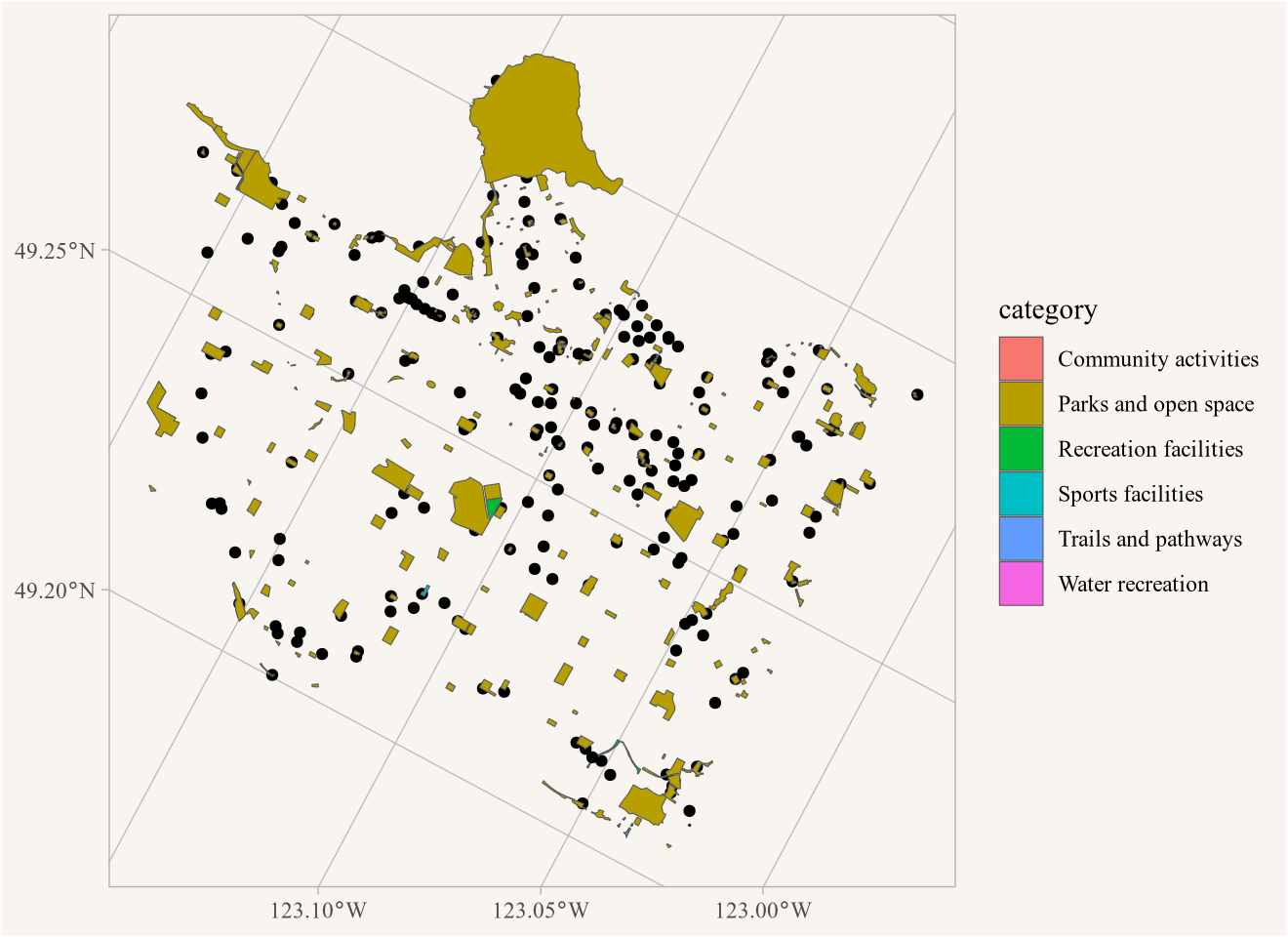
More and more data is made available as parquet, unfortunately not always in a way that is easy to interact with in the cloud. For example, the City of Vancouver open data portal API can now server parquet files, but they are API requests that download the whole file and not suitable for working with remotely. Similarly StatCan’s Open Database of Sports and Recreational Facilities is available as geoparquet (Yay!) but wrapped inside a zip archive and needs to be downloaded to use.
There are also a couple of custom under the hood refinements in r2parquet that extend DuckDB functionality. One of these is plugging some holes in geoparquet support, extending spatial filters to DuckDB queries and providing sf support when collecting data. There is some overlap with duckspatial and sfarrow, but it felt simpler to keep this package lean rather than adding dependencies and losing control over the API.
It also adds some little tweaks that are provably better implemented in DuckDB directly, in particular how filtering of integer columns works when using (whole-number) doubles, which is quite common in R and can lead to whole parquet files getting downloaded to preform the filtering when only a small portion is needed.
Upshot
Both of these packages are born out of necessity. safeconduct is a package I would have rather not written, but circumstance necessitated it. r2parquet is a package that I probably would not have written if not for the immediate need for more a principled way to host data, but I am glad I did write it. It will remain genuinely useful to me even after the immediate triggers, StatCan and City of Vancouver Open Data, fix the issues on their side.
Having a principled way to host data on a highly available and cost-effective service in a format with proper schema specifications and standardized multi-lingual metadata with defaults geared toward remotely querying the data in a quasi-database fashion is genuinely useful. And r2parquet has opened up new ways to work with data and build applications on top of data for me. I already have some exciting products in the pipeline that leverage this and I am hoping to share soon.
Generally I mostly develop packages for my own use, but if others find these useful there are real advantages to publishing them on CRAN. For now neither of these two packages are on CRAN, although I will likely push safeconduct that way in order to fix the data download problem of my existing CRAN packages. If you find this package useful, and more importantly, if you encounter data download problems the package currently does not resolve but in principle could resolve, I would love to know about it.
Similarly, if you find r2parquet, or have ideas for improvements, I would love to know about it, and a broader interest base would push me to publish this on CRAN.
As usual, the code for this post is available on GitHub for anyone to reproduce or adapt for their own purposes.
StatCan has indicated that the changes is due to “increased bot traffic”, but looking at their mostly uninformative robots.txt, nonexistent llm.txt, and most importantly broken sitemap, all important pieces in limiting and directing bot traffic, makes blocking access feel like desperation rather than sound and informed decision making.↩︎
 safeconduct is meant to be a drop-in replacement for
  Another way around blocked download is to self-host the data. When considering self-hosting on faces two fundamental question: